Anycast: The Routing Backbone Behind CDNs
One Address, Many Servers
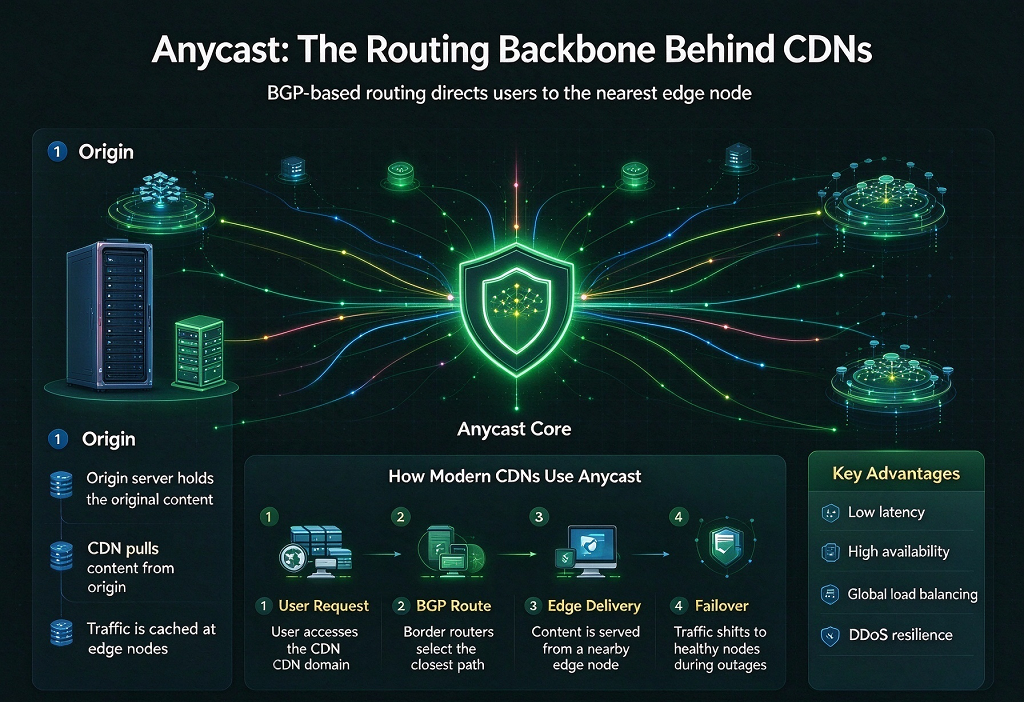
When you visit a major website or a CDN-powered page, you are probably using an anycast network without knowing it, because anycast in CDNs is announcing the same IP address from multiple data centers around the world at the same time.
With unicast, one address points to exactly one machine. If that machine is in Los Angeles, a visitor from Sydney has to cross the Pacific for every request. With anycast, that same address exists in Los Angeles, Frankfurt, Singapore, Tokyo, and a dozen other places, and the network itself decides which copy of the address is “closest” for you. The routers do this automatically, using the same BGP logic that moves ordinary traffic across the internet: they simply pick the shortest available route, and the shortest route usually leads to the nearest announcement point.
A 30-Year-Old Idea
Anycast is not a new trick invented for CDNs. The concept was formalized in 1993, in RFC 1546, as a way to rethink the internet’s original “host model”: instead of an address identifying one machine, the authors proposed that an address could identify a service, and the network would deliver your request to whichever instance of that service is nearest. That paper gave the technique its name.
For years it stayed mostly a research idea, until the DNS world gave it its first big jobs. The most critical lookup infrastructure in existence, the internet’s root name servers, began deploying anycast sites in the late 1990s and early 2000s, so that a single “server” identity could actually be hundreds of machines scattered across continents. When a large-scale DDoS attack hit all 13 root server identities in October 2002, the lesson was taken to heart: the response was to expand anycast deployments aggressively, because hundreds of scattered sites are far harder to knock out than 13 fixed targets. Projects like AS112, which absorbs misdirected private-address traffic, also run on anycast.
In other words, anycast earned its reputation in the most high-stakes infrastructure the internet has, long before it became fashionable among website owners.
Early CDNs Did Not Use It
Here is a fact that surprises many people: the first generation of CDNs, back in the late 1990s, did not build their content delivery on anycast. Providers like Akamai pioneered the industry with DNS-based traffic steering — a mapping system that looked at where the visitor was, predicted which data center would serve them best, and answered each DNS query with a tailored, unicast address.
Why not anycast? Because at that time, plain BGP “shortest route” selection was a blunt instrument: it takes load into account poorly, routing changes can flap sessions, and a provider that wants fine-grained control over which user goes where may prefer to make that decision in DNS, where business logic lives. For a young industry still proving itself, deterministic DNS steering felt safer.
The turnaround came gradually. Through the 2000s, anycast kept proving itself in DNS infrastructure, and hardware, routing hygiene, and operational experience caught up. By the 2010s, a new generation of CDNs rose with anycast-first architectures as a core selling point: one network, one address, edge locations everywhere. Today, “anycast edge network” is essentially the default design for new CDN providers, while some of the largest older players still run hybrid setups — anycast for the general case, DNS steering where it gives finer control.
How Modern CDNs Use Anycast
Modern CDN usage of anycast has also evolved beyond the textbook picture:
Entry networks are anycast, selection logic moved inward. The visitor’s request lands at the nearest edge location via anycast, and smarter decisions — load balancing, cache state, health of upstream paths — happen inside the network at layer 4/7, where the platform has full information.
Hybrid regional designs are common. BGP routing to some regions (networks in mainland China being the classic example) is messy enough that many providers deliberately announce some locations differently, or steer those regions through DNS instead. “Global anycast with regional exceptions” is a very real architecture.
Anycast DNS is everywhere. It is not just the CDN entry that is anycast — the authoritative DNS servers and resolvers that resolve your domain in the first place are almost universally anycast networks too. The “nearest path” principle starts one step before your CDN even sees the request.
Within each edge site, ECMP spreads traffic. One site may contain dozens of servers, and routers use equal-cost multi-path routing to share load among them — anycast gets you to the building, ECMP picks the desk.
Which CDN Features Are Powered by Anycast
For a website owner, anycast is invisible — but several everyday CDN features quietly depend on it:
One CNAME for the whole world. You point your domain at a single CDN hostname, and visitors everywhere are automatically pulled to their nearest edge location. No per-continent configuration, no geo-based CNAME juggling. That “just one record” experience only works because the entry network is anycast.
Automatic failover. When one edge location fails or gets disconnected, BGP routes around it within seconds. Your visitors rarely notice — there is no “backup node” to activate, because every node is simultaneously the primary and the backup.
DDoS absorption. An attack aimed at the shared address gets diluted across all the sites announcing it; the flood is spread thin instead of concentrating on one door. We touched on the filtering side of this in the previous article, “L7 vs L3/L4: Can a CDN Stop All Attacks?” — anycast is the stage that makes those defenses practical.
Fast DNS resolution. Because the provider’s DNS layer is also anycast, lookups resolve quickly worldwide before your content is even requested.
No configuration overhead as you grow. Whether your audience is in Europe, Asia, or the Americas, the entry point stays the same. The architecture scales with you.
Now the question you might be asking: is anycast a paid feature? No — and this is worth understanding clearly. Anycast is not a product SKU or an add-on; it is the network architecture itself. No CDN bills you separately for “anycast access,” and there is no toggle to enable it. Whatever you pay for — bandwidth, requests, security features — rides on that architecture, and the same is true on free tiers: a free plan on an anycast CDN gets you exactly the same anycast entry, nearest-node routing, and failover behavior as a paid plan.
How to Tell If a Provider Uses Anycast
You do not need special tools, just a healthy dose of curiosity:
Ping or look up the CDN hostname from different regions. Tools that test from multiple locations (there are plenty of free “global ping” services) should show the same IP address with very different response times — fast from each region. Same address everywhere, fast everywhere: that is the anycast signature.
Traceroute from far away. If the path towards the CDN’s IP consistently ends at a location near you, rather than a fixed distant city, that points to anycast.
Ask, or read the docs. Providers that run anycast networks tend to say so loudly, because it is a selling point. If the documentation only talks about per-region endpoints and DNS geo-steering, you are likely looking at a unicast or hybrid design.
Why Understanding Anycast Matters to Us
Understanding anycast changes a few practical things about how you build and run a site:
You know what to ask when choosing a CDN. Is the entry network fully anycast, or hybrid? How are regions with messy BGP routing (like mainland China) handled — anycast, DNS steering, or a partner network? These questions matter more than most feature checklists.
You read speed tests correctly. The same CDN hostname resolves and routes differently from different continents, and that is by design. A slow test result from one region does not describe the experience of visitors elsewhere — test where your visitors are.
You debug more sanely. If your site is unreachable and one edge location seems sick, you also understand why it may recover on its own within minutes, as traffic reroutes — and why that moment is a good time to check your origin separately.
You know where anycast fits when building your own CDN. A self-built CDN usually starts with a single node on unicast — perfectly fine for one location. Once the nodes multiply and you want visitors to land on the nearest one automatically, anycast becomes the natural next step — but it requires BGP and ASN resources that most individuals do not have. That is why many site owners turn to a self-built CDN platform instead of building the whole stack from scratch. 99CDN, for example, offers self-built and custom CDN services: its self-built CDN platform installs with a single command, the free tier supports 2 nodes with a basic IP library, and the nodes plus the caching and scheduling system run on your own servers — a self-built CDN you fully control, without writing the stack yourself. For more complex needs, there is also its custom CDN service.
You keep expectations honest. Anycast explains how you get to the nearest door quickly; it does not guarantee what happens after you walk through it. Cache hit rates, origin performance, and route optimization between the edge and your origin decide most of your real-world speed. Anycast is the foundation — the architecture everything else sits on — but a fast site still needs the rest of the stack done right.
The Bottom Line
Anycast started in 1993 as a paper idea about services instead of hosts, grew up inside the internet’s most critical DNS infrastructure, and eventually became the default skeleton of modern CDNs. When your site rides on a CDN with one CNAME, automatic failover, and DDoS absorption, you are using anycast every day, because it is the network itself.
Thank you for reading all the way to the end!